“Your life reflects what you tolerate.”
Tony Robbins
When I first moved and got my car, I missed the aux input from my old stereo. With an aux input, I could plug in my phone, listen to podcasts, and make my commute feel a little more useful. I figured that once I was settled, I would replace the stereo.
Until then, I would make do.
The First Workaround
At first, making do was fine. I listened to the radio and old CDs. When I wanted to listen to podcasts, I shifted that habit to running instead.
That sort of solved my problem – sure I still had podcast listening time, but not during my drive. It also meant all the music and podcasts on my phone were not available in the car, just the same rotation of CDs.
The workaround was acceptable enough…and that’s exactly what I did, I accepted it.
The Better Bad Solution
Later, my dad gave me an FM transmitter. The sound quality was not good, but it was fine. However, it did let me listen to podcasts in the car again, so I accepted it.
The signal dropped sometimes. The volume was low. The experience was not good. But it crossed the threshold of tolerable, so I kept it.
Eventually I found a way to hang the transmitter cable from the visor, which improved the signal a bit. It looked weird, was a little inconvenient but the sound was better than before – though still worse than the real fix.
However that is how it remained, until years later when I purchased a new car that had an aux input and I hooked up a Bluetooth receiver. Finally – good quality, wireless, and easy for my friends to connect their music as well.
The Worst Acceptable Solution
Why didn’t I simply buy a new car stereo? Why did I let things continue the way they were?
Annoying but workable is where bad systems learn to survive.
Because – the system was not broken. If it were broken, I probably would have fixed it. But it was the worst acceptable solution: annoying, but workable enough.
So I adapted around it, accepted it – and just lived with it.
At Work, It Looks Familiar
In my professional life, I’ve seen the same thing – in software, often tech debt. Worse: tech debt that is continually built upon because the small annoyances and inefficiencies slow things down, but don’t stop enough impactful work.
Meanwhile, we know that the tech debt needs to be addressed – though unlike in my situation, unaddressed tech debt gets worse and worse.
Product quality with weird workarounds is another example. Small quality issues become accepted, and can lead to a new, lower normal.
That is the curse: once a solution is barely acceptable, it can become surprisingly hard to replace with a good one.
]]>Step 1: Improve Speaking and Pronunciation
Before I dealt with issue of speaking in public, I first wanted to be a good speaker. There’s an unfortunate catch-22 with public speaking: good speakers have confidence, but they have confidence because they are skilled at public speaking. To raise my own abilities, and confidence in those abilities, before I ever spoke in public I first practiced just speaking.
- Read out loud. I had a number of choose-your-own-adventure novels I enjoyed when I was young. In addition to being entertaining, reading them out loud allowed me to practice speaking with a broad, exciting vocabulary. Choose your own adventure books also lend themselves well to dramatic interpretation, which allowed me to play around with inflection and tone. My brother and I would sometimes take turns with them, reading a page and then debating which was the best approach. If I had to pick reading material to start with now, I would probably use op-ed pieces in newspapers.
- Emulate other speakers. As a child I watched Wheel of Fortune with my family. Pat Sajak had a calm, clear speaking voice. When I started looking to improve my speech, I would watch and quietly repeat what he said to myself, and later while reading out loud in my room, or even in conversations with friends, I would ask myself “How would Pat Sajak say this?” Pat Sajak was the ultimate host – he made people feel at ease, projected confidence and charisma, and spoke clearly. I noticed how he looked people in the eyes, his body language and the way he was expressive with his hands and body – but not too expressive. Eventually I stopped emulating him, as I grew into my own as a speaker.
Step 2: Practice Speaking and Poise
Once I was comfortable with speaking out loud clearly, I needed to improve my timing, tone, inflection and presentation. There were no shortcuts for me – just lots of practice and steady improvement.
- Practice speaking to a mirror. This has always been a little difficult for me. The usefulness of this activity is hard to dispute though. The feedback is clear and immediate, and as I started improving it boosted my confidence by seeing how easy it was for myself to present an argument or point of view – even if it was just to myself.
- Record yourself speaking. Video works best, but even just hearing audio will point out flaws in your speaking. You’ll notice whether you speak too slow or fast, the inflections in your voice, the “ums” etc. If you can stand it, it’s great to have someone else review your recording and critique you as well. In high school I picked up a cheap audio recorder and would record myself practicing class presentations. I did this for timing, as well as to see how I sounded – did my presentation make sense, did I speak clearly, was I too slow or fast. By the time I had to actually present in class, I had already heard the presentation a half dozen times – and breezed through it.
When I was attending USC for my master’s, I had to collaborate with other students on group projects which often ended in a class presentation at the close of the semester. Because we could not always meet in person to practice, we needed to find another way to review our speaking parts. The easy solution was to upload videos to YouTube. A couple of my classmates were foreign students who were still learning how to speak English. Watching them on video allowed me to point out grammar errors, inflection, mispronunciation, etc. After the course was over, one of them remarked to me that the group project recordings had done more to improve his speaking than the two years he had spent trying to immerse himself in America.
Step 3: Practice Speaking With Friends and Family
No real secret here – once I started improving my speaking skills, I enjoyed conversation more and was more outspoken among friends. If you lack interesting material to talk about, consider reading some of my favorite personal development books. Some other stories and thoughts from this site that provide good conversation fodder include:
- Famous Failures – Michael Jordan, Abraham Lincoln and J.K. Rowling
- The Price of my Dreams – $60 a Week
- Are You Really Working – or Just Using Metawork as an Excuse to Avoid Real Work?
Step 4: Practice Speaking to Others – For a Small Audience
Once I had confidence in my abilities speaking, there were still a couple hurdles to cross. Among them – would I run out of things to say, and since speeches are a one way street, how would I know if my audience was interested? There are a few social situations that can help with this
- Multiple person dinner/party conversations. All human interaction isn’t just one on one – oftentimes we’ll meet for dinner with multiple people, or perhaps I’ll be in a circle of friends at a party. In these cases, when I’m talking and more than one person is listening, it’s a bit like a radio show – myself and the person speaking are the radio hosts, and the other spectating conversationalists are our audience. These situations (unintentionally) present fantastic opportunities to work on speaking skills in a (generally) warm environment
- Committee meetings and debate. I was in a number of service clubs, social clubs, student government organizations etc as a child. Even at work I continue to have small 3-6 person committee meetings. Once again, this provides a small, reasonably receptive audience to speak to – and one or two people who would provide immediate feedback.
Step 5: Practice in Small Venues
Once I was able to present my point of view in front of spectator audiences, it was time to speak to real audiences. I started small, in welcoming environments
- Toasts/Speeches at Social Events. Nobody is going to boo you off stage if you choose to make a toast at a New Year’s, etc. Depending on your level of comfort, it can be simple (“Here’s a toast to health and happines in the New Year!”), or perhaps a short speech if appropriate for the event. Remember, it’s just about practicing speaking.
 Toastmasters. I’ve attended a few toastmaster’s meetings. Though I never stuck with it long enough I have no doubt regular attendance would boost anybody’s speaking skills. The meetings I attended were well organized and everyone had a chance to speak, if only for a few minutes. Members also were able to present longer speeches (5-10 minutes) that they had worked on and prepared on various topics for the group, who then critiqued them and provided feedback on the presentation, as well as how well the speaker presented. Practice coupled with constructive criticism is a surefire recipe for public speaking success.
That’s it! Once I was able to speak comfortably at small venues, it was just a matter of increasing the size of my audience. I typically do not speak to groups larger than 50-100 people in person, but I imagine past that point any issues that arise would be most likely related to intimidation and stage fright. There’s no cure for that except for preparation, practice and putting yourself out there. I have glossed over stage fright above, because it’s hard to address that directly – but after considering it, I think I have an explanation for how I overcame stage fright as well.
Bonus Tip: Non-Speech Performances to Increase Speaking Confidence
 The above steps are the basic formula I followed to improve my public speaking skills, but I have one final tip which didn’t fit in the above categories, but that definitely helped me overcome stage fright. The secret? Performing in domains where I already had expertise, just to get me comfortable in front of an audience.
- Spectator Sports. Throughout school I played various sports – swimming, soccer, baseball, basketball, table tennis, tennis, badminton. I was not a particularly good athlete, but my parents had to come cheer me on anyway. Being out on the field in front of people, win or lose, gave me the confidence to be out there. I am sure it helped that my parents were supportive – so be sure to bring some cheerleaders along.
- Karaoke, chorus, concerts and open mic nights. I’ve always enjoyed music – I played piano when I was younger and play guitar now. I sang in chorus, played for hundreds of people at concerts and have performed at dozens of open mic nights by myself. Any chance I get, I’ll sing at karaoke as well. Hamming it up for friends and strangers helped boost my confidence to once again deal with stage fright, which made facing crowds easier when I delivered seminars and speeches.
- Plays and theater performances. My good friend Ryan took a theater class his first year in college, and while he was hardly shy before that, taking the class definitely made him more outgoing. Making a fool out of himself on stage, in front of 500 of his classmates, with no negative repercussions has helped him be effective in his role as a manager today.
A Final Point – Experience and Expertise
One point I have glossed over above is that it takes experience and expertise to speak effectively on a topic. I can discuss with confidence various technology trends, blogging, web 2.0, time management, efficiency, etc – but I have no skill in other areas. The reason I can speak confidently about certain domains is because I have the years of experience, training and personal study to back them up. Put me in a situation where I need to discuss something that I have no familiarity with, and without adequate preparation time I’m sure to falter. If you need to give a speech, don’t be scared of pushing your limits, but at least be aware of your expertise – and spend an appropriate amount of time preparing.
What do you think? What other tips would you add?
Enjoy this article? Share it with your friends with this short link:
]]>“A wealth of information creates a poverty of attention.”
– Herbert A. Simon
Most mornings, before I write anything or settle into the day, I have to decide how much of the internet I am going to let into my head.
That sounds a little dramatic, but it is the practical question. Every day brings a pile of things that might be worth my attention: some useful, some interesting, some merely loud, and some that only felt important because I saw them at the wrong moment.
The hard part is not finding information. The hard part is deciding what deserves attention, what can be skimmed, what should be saved, and what should be ignored without guilt.
I do not think the goal is to consume more. I think the goal is to consume less randomly.
What Used To Be Here
Notice something different? The original version of this post was about how I processed 12,853 articles, forum topics, and blog posts in a week using Google Reader, Delicious, keyboard shortcuts, and a very 2008 set of tools. I have updated it to reflect how I think about reading, filtering, and attention now.
The First Filter Is Time
Start with time.
If I do not decide how much time online reading deserves, the internet will happily take the rest.
So the first question is blunt: how much of my day do I actually want to give to intake?
Not writing. Not thinking. Not building. Not talking to people. Just intake.
There are seasons where I want a lot of input. I am learning a new area, researching a decision, following a fast-moving topic, or trying to understand what people are noticing. In those moments, more reading is not avoidance. It is part of the job.
Without a boundary, though, reading turns into a very respectable way to avoid choosing what I am going to do with what I already know.
Separate Triage From Reading
The move is to separate jobs that should never have been collapsed:
- deciding whether something is worth reading,
- reading the things that survived that first pass,
- saving useful references,
- joining the conversation when I actually had something to add.
Those are not the same activity.
Scan. Choose. Read. Save. Respond.
Triage should be fast. Title, source, summary, maybe the first paragraph. Is this relevant? Is it timely? Is it likely to change something I think, decide, or do? If not, it can go.
Reading is slower. That is where I am actually letting someone else’s argument into my head and giving it enough attention to see whether it holds together.
Saving is different again. Sometimes I do not need to read the whole thing right now. I just need to know it exists, tag it well enough that future-me can find it, and move on.
Responding is its own thing. Commenting, replying, forwarding, posting, debating, adding my view to the pile. That can be valuable, but it is not the same as reading. It uses a different kind of attention.
When I mix all of those together, I get slow and reactive. I open something, half-read it, click a link, skim another post, save the first one badly, start typing a reply, remember I was supposed to be doing something else, and somehow call the whole thing “research.”
A cleaner process makes each pass cleaner.
Most Things Do Not Need A Full Read
Most things I encounter online do not deserve a full read from me.
That is not an insult to the writer. It is just math, and pretending otherwise is how I lose an afternoon.
Some things are interesting but not useful. Some are useful but not useful right now. Some repeat an idea I already understand. Some are worth saving as a reference but not worth reading end to end. Some are mostly news, which means they feel urgent for an hour and then vanish from my life completely.
I try to be ruthless with this. If I get a few paragraphs in and realize the piece is not going anywhere I need to follow, I stop. If the headline looks vaguely interesting but not important, I save it for a second pass. If it still does not feel worth reading later, I let it go.
That second pass matters. A surprising amount of “I should read this” fades if I give it a little time.
The first impulse is often curiosity. The second pass is judgment.
Batch The Similar Work
Batching helped because switching modes has a cost.
If I am processing new items, I want to stay in that mode: scan, decide, skip, save, move on. If I am reading, I want to read. If I am replying, I want to reply. If I am organizing references, I want to do that deliberately.
Almost every modern reading tool mixes signal and noise together. My attention works better when I decide what kind of work I am doing inside that stream.
The tool wants to present everything as one stream. I do not have to accept that as my process.
I do not always succeed at this. There are plenty of days where I click around too much, skim without retaining anything, or open a pile of tabs that mostly become browser furniture. But when I am at my best, I am usually not asking, “What is the next interesting thing?”
I am asking, “What mode am I in right now?”
Use Tools To Support The Decision
Tools matter when they reduce friction around the right decision.
The specifics change. Sometimes the useful thing is a fast keyboard shortcut. Sometimes it is a read-later queue, a bookmark folder, a search system, or a plain note where I can put something without letting it hijack the present.
The specific tool matters less than the job it is doing.
For me, the useful questions are:
- Can I move quickly through low-value items?
- Can I save something without pretending I need to read it now?
- Can I find saved material later?
- Can I keep reading from turning into constant context switching?
If a tool helps with those, it is useful. If it mostly gives me a more elaborate place to avoid deciding, it is just a nicer-looking pile.
The Real Goal
Attention needs a system around it.
Without one, every incoming item gets to make its own case in the moment. The interesting headline wins. The loud thread wins. The tab I already opened wins. The thing that is easiest to keep skimming wins.
A simple process changes that. Not perfectly, but enough.
It lets me say: this is noise, this is worth a skim, this deserves a real read, this should be saved, this is worth responding to, and this can be ignored.
That last category is underrated.
There is too much internet to read. There always was. The useful skill is not keeping up with all of it. The useful skill is building enough of a filter that the things I read have a chance to matter.
]]>I also reviewed a team of virtual assistants, and compare my single virtual assistant versus a team of assistants with task based processing.
The Experiment
I know some of the day to day tasks I do online suck up a lot of my time. I have automated some of these tasks, such as automatic email filtering, and streamlined other processes such as how I read blogs. I decided to try an experiment with a virtual assistant, to see if I could effectively outsource parts of my digital life. I also compared my solo virtual assistant to a professionally managed, concierge style virtual assistant team.
What I expected
I imagined I would be able to save some time with a virtual assistant. Further, I hypothesized that the team would do a better job than my solo assistant – but would be more expensive, and it would end up being a decision based on value provided.
A Normal Sid Life Processing Flow
Before we get to comparing the virtual assistants, let’s set up the base task processing workflow. I am one person, I have a list of tasks to do, and I do them:
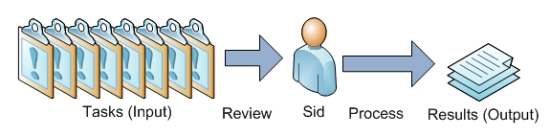
Of course, we can see where the bottleneck is here: Sid.
Pros:
- Consistent quality
- Simple organization hierarchy – Single point of contact
- Task progress constantly updated and available
Cons:
- Doesn’t scale
- Single point of failure
Sid Life Processing with One Virtual Assistant
To remove the bottleneck in the process above I add a second person and delegate some tasks to them.
In this case, some of the tasks I have been delegating are:
- Researching various items for me in spreadsheets
- Summarizing data
In the new workflow, yellow arrows show processes the virtual assistant is handling, and blue show processes Sid is handling:
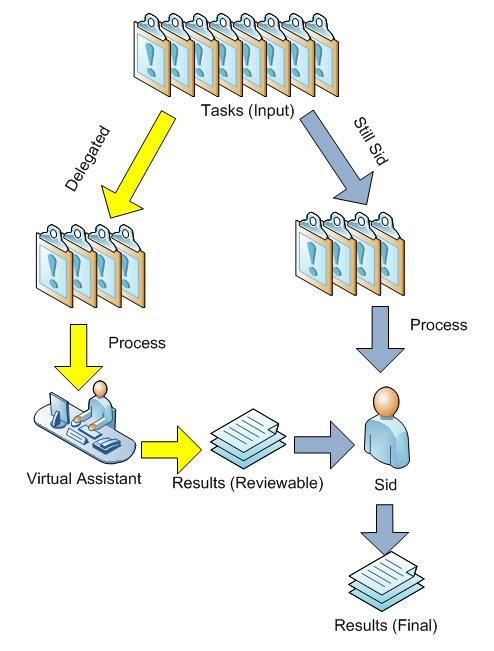
With two people, I’ve already increased my efficiency.
I still have to review the work, but it takes 5 minutes to review versus a couple of hours to do it. While the initial set up took some time and I needed to go back and forth to get the quality up to par, now that we have a smooth system set up Prabhu is executing well.
Pros:
- Consistent quality provided the tasks are well defined
- Improved efficiency for my low urgency, high priority tasks. I can take them off my task queue and hand them off
Cons:
- Doesn’t completely scale – There are still some limits on hours and availability
Life Processing with a Virtual Assistant Team
I compared a few services that provide a task based (as opposed to assistant based) solution, where each task goes into a queue and is handled by whatever assistant is available and qualified.
Now I can assign multiple tasks, and if the service has the bandwidth available, all my tasks will be worked on at the same time:
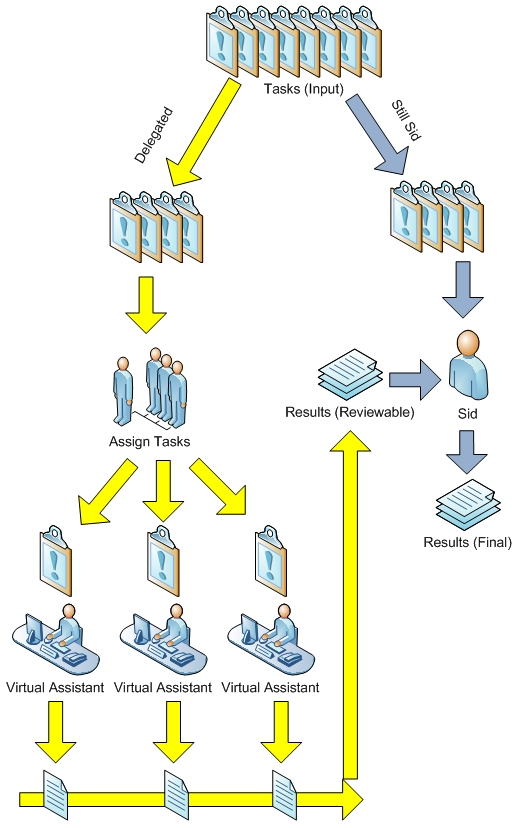
I think this new model is very interesting, and on the surface looks like it would be much more efficient than having a jack-of-all-trades type assistant, since each task can be handled by an optimized person.
How does A Team of Assistants stack up?
Pros:
- Consistent quality – again, provided the tasks are well defined
- More tasks at once With multiple people working at once, instead of 2-3 days of a single virtual assistant’s time, I had all my research back within 5 hours.
Cons:
- Additional communications channels – since I don’t know who exactly is working on a task, if I want to speak with them I have to call, have the specific aide located, and then I can contact them.
Comparison of Approaches
So, what are the main benefits of each approach?
- No assistants: The biggest benefit of having neither is simplicity. There is overhead in providing assistants enough details so that they can complete a task without your intervention, as well as reviewing their work.
- Single virtual assistant: A single assistant provides you with a consistent, loyal workforce you can depend on, such as in my case. The downside here is if your assistant is sick/unavailable, that’s too bad – unless you have a backup assistant, you likely are going to be without help until they are back to 100%. Over time, they will become more skilled to your specific needs and likely not need any retraining.
- Virtual assistant team: I think the biggest benefits of the team approach vs a single assistant are 1) the quick turnaround, 2) the multiple aides working on multiple tasks at a time and. The biggest downside is you may have to get a service, which will add overhead costs or you need to vet more people individually.
Conclusion, Recommendations
- No extra tasks, I can handle everything and/or I don’t like delegating: Don’t hire anybody.
- I have consistent repeated, reasonably skilled, easily outlined, low urgency tasks: A single virtual assistant will likely suffice.
- Varied, occasional tasks that can be very urgent and require a timely response – for this situation specifically, you might consider a team of round the clock assistants, or a local virtual (or even real life!) assistant.
“People are always blaming their circumstances for what they are.
I don’t believe in circumstances.
The people who get on in this world are the people who get up and look for the circumstances they want, and if they can’t find them, make them.“
We are all capable of so much more than we accomplish, and often fall short of our potential.
One excuse I often hear (and sometimes make) is how we did the best we could, and then blame our failure on “the situation.” For example:
“It might have looked like I dropped the ball on that one, but I did the best I could – given the situation.”
Sometimes that is a real reason – but more often than not, it is a temporary obstacle that you need to get through. And today, I will show you how.
Making Excuses with “The Situation”
There are times when this blanket reason of “the situation” is legitimate. Perhaps physical constraints, disabilities, or absurdly difficult obstacles presented a “situation” that was impossible to overcome.
Often however, I have found that “the situation” is an excuse used to avoid confronting a difficult problem that has a difficult, uncomfortable or uncertain solution.
Rather than tackling the actual issue head on, we instead pretend there is no way to resolve some solvable problem, work around it and then say we “did our best, given the situation.”
We are not powerless. Every day we can decide to accept things that happen to us, or to confront issues and to change them.
Examples of “The Situation”
Below are a couple of common “situations” that hold us back.
I then will show you some possible real issues that are causing “the situation” – and the difficult solution or decision that needs to be made, but is being avoided.
There is not necessarily a right or wrong answer in each tradeoff.
Oftentimes, however, this exercise helps us realize that either a difficult change needs to take place, or perhaps sacrifices made – or else we won’t be able to accomplish what we set out to do.
| “The Situation” | The Real Problem(s) | The Difficult Questions(s) |
| “I couldn’t stick to my diet – we went out for happy hour.” |
|
|
| “I haven’t been working on that – I’m too tired, since I haven’t been sleeping as much as I would like. |
|
|
Five Steps For Beating “The Situation”
The above table discusses this through example, and here is a five step process for helping you make the difficult decisions you need to resolve “The Situation” –
- Realize that nothing is non-negotiable. Everything in your life can be responded to and reacted to
- Define “The Situation.” Write down the specific conflict that are causing your situation.
- Define the real issue causes of this conflict.
- Ask yourself the tough questions to resolve your conflict.
- Answer the tough questions, and move on. Simmer in step 4 for a little while, consider your options and think through your individual situation. Once you’ve decided on a course of action, accept your answer and move forward.